ScopeDive AI · estimating intelligence built in

Estimating and bidding software built for custom metal, wood, glass, handrail, steel, cabinet, sign, mill, stair work.

Steel, glass, wood, marble, hardware and every finish, priced scope by scope, down to the last washer. Revisions, alternates and the proposal live in the same estimate.

  • Build your own estimating tools
  • One central library, set up for your shop
  • Revisions and alternates, side by side
  • Company Brain, powered by ScopeDive AI
ScopeDive project overview in a full application window: final project bid, cost buckets, alternates, cost distribution and the scope table for a demo job

4:42 PM

The owner meeting is at 8 AM. The alternate is due tonight.

Addenda, RFIs and owner notes keep landing while you're mid-bid. ScopeDive keeps every notice with its project and prices a change as an alternate, without touching the base bid.

4:42 PM

Before ScopeDive
An estimator sitting at his desk with a hand on his forehead, a blank monitor in front of him, drawings and papers piled up
  • Addendum #3Sheets S-101 to S-104
  • Owner NotesLobby finishes
  • RFI #112Answer needed on stair rail
  • Owner RequestLobby scope review
  • Scope reviewDivision 05 clarifications
  • Project Notice #345Revised bid date

4:47 PM

With ScopeDive
The same estimator standing, relaxed, on the phone and putting on his jacket, ready to leave

I'm leaving in 15 minutes.

Riverside Campus RenovationRev 2
Alt 1 · Lobby breakout · added
  • Addendum #3
  • Owner Notes
  • RFI #112
  • Owner Request
  • Scope review
  • Project Notice #345

Build a bid in minutes

From new project to proposal in five steps.

Start a project, add and price scope by scope, review every number, and send a clean proposal.

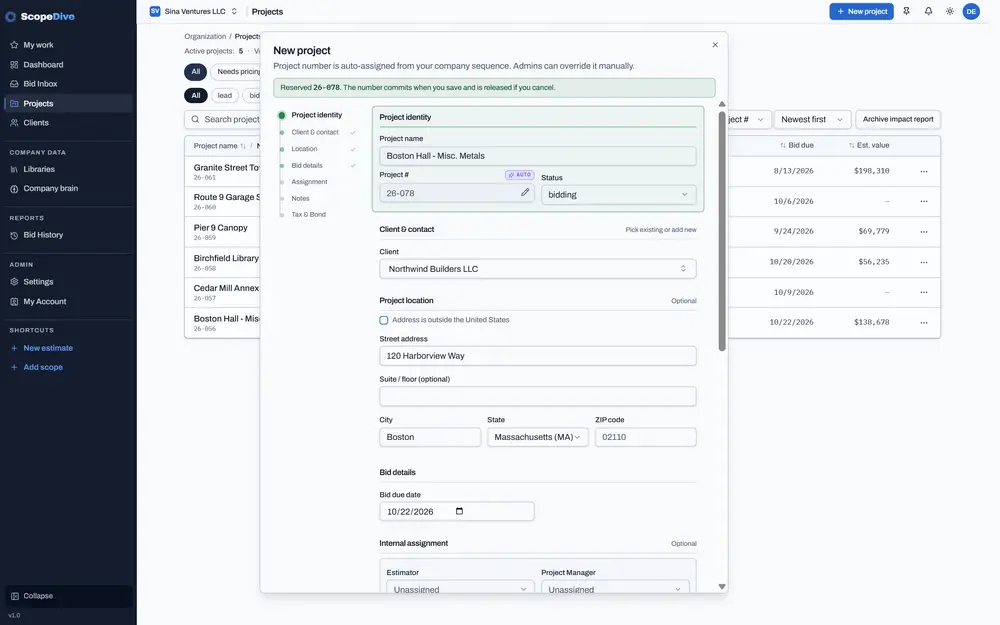
Name it, pick the client and the bid date.

ScopeDive new project form with name, client, address and bid due date filled in
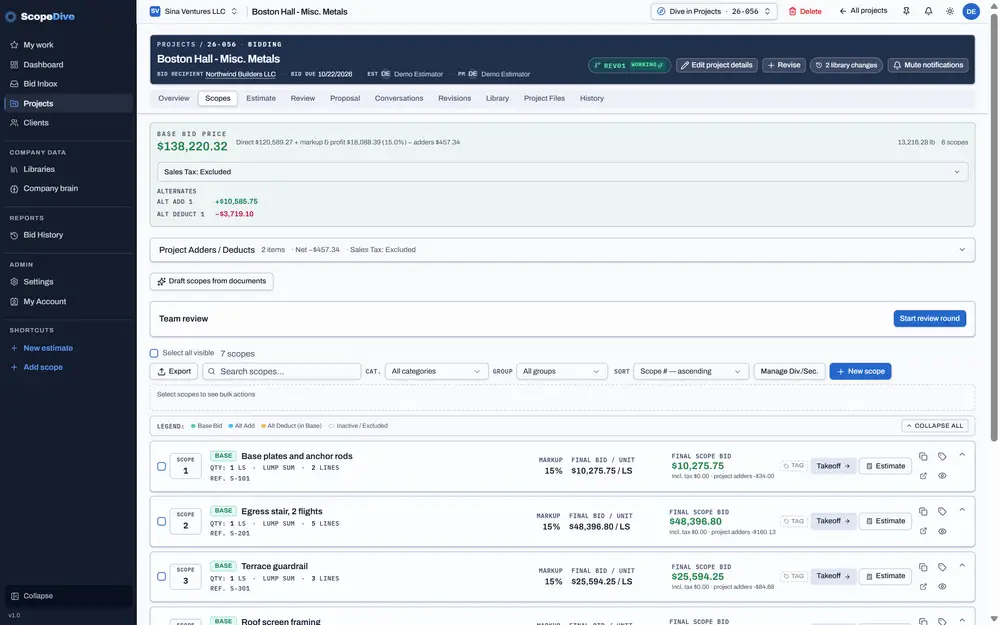
ScopeDive scopes tab listing the scopes of the project, base scopes and alternates, with a New scope button
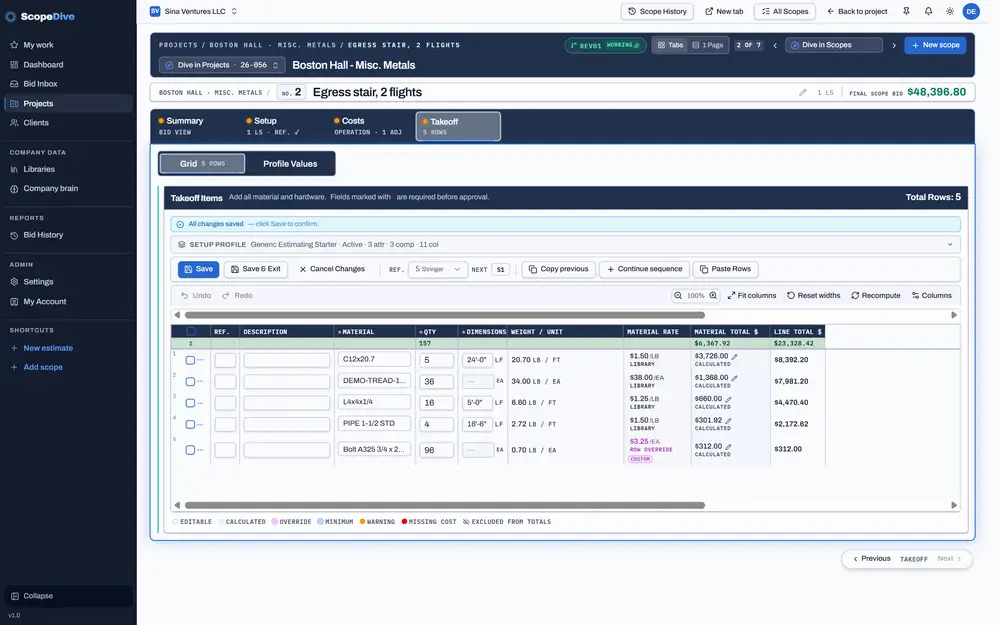
ScopeDive scope page with the takeoff grid, each line priced from the material library
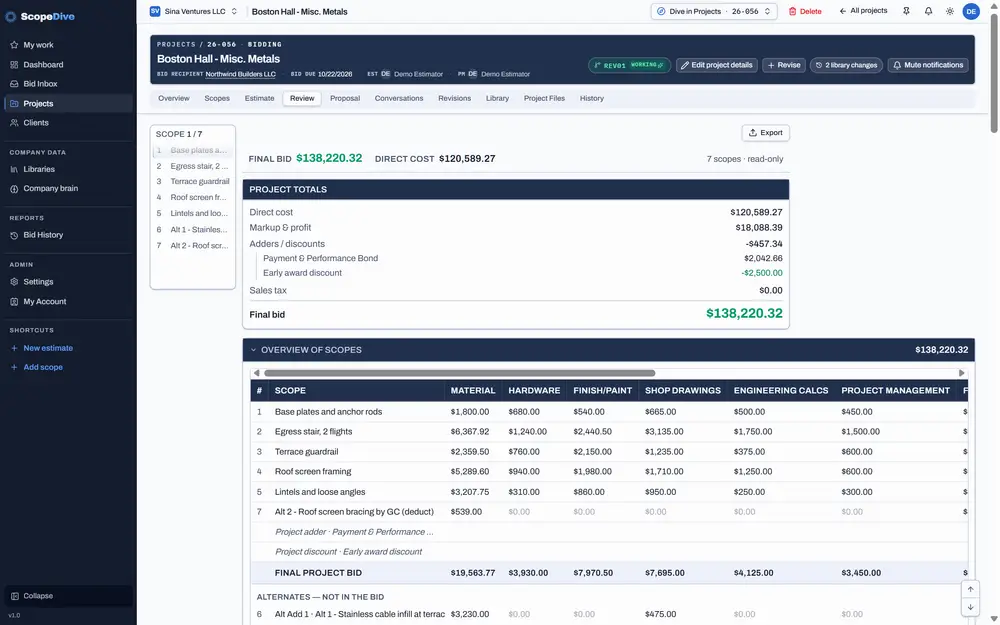
ScopeDive review tab: project totals with markup, adders, discounts and the final bid, and the overview of scopes
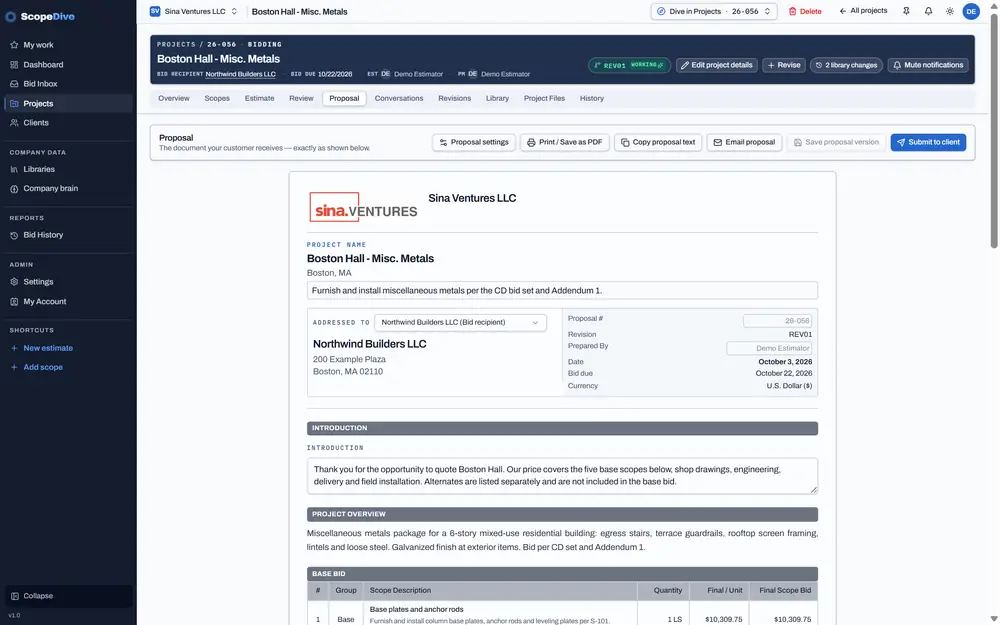
ScopeDive proposal tab with the proposal document and the Print / Save as PDF button

What you get

Everything a custom shop prices, in one place.

Estimate

Powered by ScopeDive AI

Every cost of the project, in one organized view.

ScopeDive lays out every cost of a project in one place, scope by scope: material, fabrication, paint, erection, transportation, subcontractors — you name it, and whatever else your business needs.

  • Every cost bucket on one screen
  • Markup, bonds and sales tax
  • Scope notes, qualifications and exclusions
  • Revision management and bid cost grouping
  • Easy review and team collaboration
ScopeDive estimate tab: final project bid, cost split by bucket in a chart, project markup, the project cost buckets and the scope table

Material library ↔ estimate

Powered by ScopeDive AI

Your library feeds every estimate.

Shapes, plate, glass, wood, hardware and finishes, with your own costs, weights and suppliers. Change a price once and see every open bid it touches.

  • Your costs, your weights, your suppliers
  • Where every item is used, across every project and scope
  • Update one row, one project or the whole library
  • Metric and imperial, side by side
ScopeDive material library listing the materials in use, with code, shape, size, grade, unit, weight, cost and where each one is used

ScopeDive AI

The estimating intelligence behind every number.

Behind every screen runs ScopeDive AI, an estimating intelligence engine that learns from your own history: past bids, wins and losses, and the hours and rates your shop really carries. It checks every scope against that knowledge and flags a number that doesn't fit before the bid goes out.

  • Learns how your shop actually prices work
  • A brain check on every scope, before it ships
  • Onboarding in days: your history comes with you
  • Your data trains only your company's brain, never shared
Learned from 212 jobsUpdated today
Learned categoryTypical rangeJobsConfidence
Egress stair18–26 hr / ton18High
Guardrail, galvanized$0.48–0.62 / lb31High
Lintels & loose angles22–30 hr / ton24High
Bollards3.5–5.0 hr / EA12Medium
Roof dunnage14–20 hr / ton9Medium
Brain check · S-02 Egress stair
Shop fabrication
42 hr / tonLooks high
Galvanizing
$0.55 / lbIn range
Field installation
3 daysIn range
  • Misc metals
  • Ornamental railings
  • Glass & glazing
  • Handrail
  • Stairs
  • Architectural millwork
  • Curtain wall
  • Storefront
  • Canopies
  • Custom fabrication
“In custom fabrication, we don't say no. We always find a way. That's what to expect from ScopeDive.”
— MG Tarboush, Founder

Bid management

Powered by ScopeDive AI

Every invite lands in one inbox — and finds its project.

Invites, addenda, RFIs and owner notes come in and land with the right job. Sort by due date, value, client or status, and see what's due this week at a glance.

  • Scan your mailbox and auto-qualify bid invites
  • Bid, pass or park every invite
  • Auto-download and extract construction documents
  • Track addenda and changes
  • Team assignment
ScopeDive project list with project number, client, status, bid due date and estimated value, sortable by every column

Revisions & proposals

Powered by ScopeDive AI

Change the bid without losing the old one.

Every change becomes a revision, side by side with the last. Price alternates without touching the base bid, group costs the way the client wants to see them, and send a clean proposal.

  • Rev 1, Rev 2 … compared side by side
  • Affected items highlighted in every scope, with % change
  • Revision locking and estimate documentation
ScopeDive compare-revisions screen: project totals and cost buckets side by side for two revisions, with the change in each

Team & approvals

Powered by ScopeDive AI

Tasks, conversations and approvals, inside the estimate.

Assign a task on any scope, talk in one thread per project, and send bids above your limit to one approver who approves, asks for changes or rejects with a note.

ApprovalRiverside Campus Renovation · Rev 2
Waiting onEstimating LeadDue today, 4:00 PM

“Addendum 2 landings added and the lobby breakout priced as Alt 1. Please approve before it goes to Summit Point Builders.”

Rev 2 proposal.pdfAddendum 2 markup.pdf
ApproveAsk for changesReject
Conversation

@Estimating Lead the discount is on the review tab — adders look right.

For estimators who build systems

The Engine Room

The Engine Room is where Estimation Structure and Library settings live: how a bid rolls up, how costs are bucketed, how materials are modeled. Everything in ScopeDive is configurable. This is how the machine is put together.

  • StarterRuns on ScopeDive’s standard setup.
  • ProIncludes the Engine Room, switched on by ScopeDive during onboarding.
  • EnterpriseThe Engine Room fully open, for shops and developers who build their own setups.
Per scope
Takeoff lineunit · qty · rate
Cost componentmaterial · labor · paint · …
Cost bucketyour names, your mapping
Scope totaldirect cost + markup
Per project
Direct costall active scopes
Markup & profitper scope or project
Adders / discountsbond · insurance · …
Sales taxby tax basis
Final bidbase bid

Alternates (add / deduct) are priced as their own scopes and listed beside the base bid, never inside it.

01 · Estimation structure

project → scopes → takeoff lines → cost components → buckets → direct cost

  • Scopes are Base, Alt Add or Alt Deduct
  • Cost components map to your own cost buckets in Cost Structure
  • Markup follows the project or is set per scope

02 · Cost structure

unit · qty · rate · waste · minimum

  • Every line keeps its own unit: lb, LF, SF, EA, hours, trips
  • Waste factor on materials
  • Minimum charge: none, each line, the scope total, or both
  • Rates come from the library, from an attribute, or are typed; inherited vs typed is shown on the line

03 · Setup profiles

attributes · components · takeoff columns

  • A profile defines what a scope carries: its attributes, its cost components and its takeoff grid columns
  • Example: Generic Estimating Starter · 3 attributes · 3 components · 11 columns

04 · Library model

material → shape · size · grade → weight · unit · cost

  • Where-used: every project, scope and line a material appears in
  • Working projects follow library prices; a rate you typed never moves
  • Submitted projects keep their prices and are told what changed
  • Override on one project, or change the library default

05 · Adders & tax engine

fixed | % of base → category → rollup

  • Methods: fixed amount, % of direct cost, material, labor, equipment, subcontractors, scope total or project bid, quantity × unit cost, manual
  • Categories: bond, insurance, permit, freight, general conditions, contingency, escalation, discount
  • Bonds: flat %, tiered %, fixed or manual
  • Sales tax basis: included, excluded, exempt, taxable material only, taxable equipment only

06 · Revision model

REV00 (base, locked) → REV01 → REV02 …

  • Each revision is a snapshot of the whole project estimate
  • Compare any two: totals, buckets and scopes, with the change and the % change
  • Alternates price add and deduct separately from the base bid

Pricing

Simple plans for custom shops.

Every plan includes two users to start. Pick the one that fits how your shop estimates.

Starter

Estimating, proposals and your own material library.

Pricing announced soon

Includes 2 users

  • Estimating
  • Proposals
  • Projects and clients
  • Libraries: your own material prices
  • ScopeDive’s standard setup

No ScopeDive AI. No Engine Room.

Request early access

Pro

Includes ScopeDive AI

Everything in Starter, with the AI and the team tools.

Pricing announced soon

Includes 2 users

  • Everything in Starter
  • ScopeDive AI
  • Bid inbox
  • Approvals
  • Bid history
  • Conversations & tasks
  • The Engine Room, switched on with you
Request early access

Enterprise

For teams of 10+ users.

Pricing announced soon

For teams of 10+ users

  • Everything in Pro
  • The Engine Room, fully open
  • Onboarding of your own library and estimation structure
Request early access
Mohammed G. Tarboush, founder of ScopeDive
“For twenty-five years I've estimated custom fabrication work — steel, aluminum, brass, glass, wood and complete fit-outs, each with its own finishes and hardware. No two jobs were alike, and that taught me how many materials, units and changes go into a single bid, and how fast the numbers move when the drawings do. I built ScopeDive because the tools I tried were made for simple, repeatable work. Custom fabrication isn't simple, and it deserves software built by someone who has priced it.”
Mohammed G. Tarboush — Founder, ScopeDive Technologies LLC · 25 years managing custom fabrication operations · Boston, MA, USA

ScopeDive Consulting

Pricing custom work across your whole shop?

Twenty-five years of custom fabrication estimating and operations, applied to your shop: estimating workflow, labor standards, bid/no-bid discipline and the systems that hold them together.

Details coming soon

Questions

Frequently asked questions

ScopeDive is estimation and bid management software built for construction trade contractors. You build estimates scope by scope, price every line from your own library, manage bids, revisions and proposals, and use ScopeDive AI, an estimating intelligence engine that learns from your own history.

ScopeDive is built for custom work: metal and steel, aluminum, glass, wood and millwork, cabinets, handrail, stairs, signs and complete fit-outs, where no two jobs are alike. If your shop prices custom scopes from takeoffs, ScopeDive likely fits. Ask us.

Yes. The material library holds your own costs, weights and suppliers, and it feeds every estimate. Change a price once and see every open bid it touches. Libraries are included in every plan.

The Engine Room is where Estimation Structure and Library settings live. Starter runs on ScopeDive’s standard setup. Pro includes the Engine Room, switched on by ScopeDive during onboarding. Enterprise gets it fully open, for shops and developers who build their own setups.

Every trial is reviewed and approved by ScopeDive. Trials are free for 14 days; a credit card is needed to start. Request early access and we’ll set your shop up personally.

Both. Each company picks its units in Settings, and the whole system follows: takeoffs, estimates, the material library and proposals. You can switch anytime, and the library keeps metric and imperial values side by side.

Your data trains only your company’s brain, never anyone else’s, and it is never shared.

Starter and Pro each include 2 users. Extra users are priced per user; pricing will be announced soon. Teams of 10 or more should look at Enterprise.

Enterprise is for teams of 10+ users. It includes everything in Pro, the Engine Room fully open, and onboarding of your own library and estimation structure.

Request early access. A person replies within 2 business days and sets you up personally. Founding shops get hands-on setup and a direct say in what we build next.

Founding shops

Price your next bid in ScopeDive.

We're onboarding a first wave of fabricators by hand — your library, your rates, your past bids. Founding shops get hands-on setup and a direct say in what we build next.

ScopeDive review tab: project totals with markup, adders, discounts and the final bid, and the overview of scopes

Join our newsletter

Product updates and estimating notes from the shop floor.

Opening soon